

 |
FAQ |
How to View a Listing of Your Team's Placements
This FAQ is designed to show the Club/Association Officers, Coaching Directors, Registrars and applicable Staff Members how to view a Listing of their Team's Competitive Placements on the District IV Website.
This function displays a listing of all teams under their authority based upon Team ID#'s that have been placed into a competitive assignment (i.e. League, Cup, Tournament, Jamboree, etc.). Only a team that has in fact been placed into a competitive assignment will be visible to the applicable individuals in this listing.
To View a Team Placement Listing
First, If you have multiple authorities, you would select the desired authority first on the Segment you are working with - D/C or Officer or Registrar or Staff as applicable.
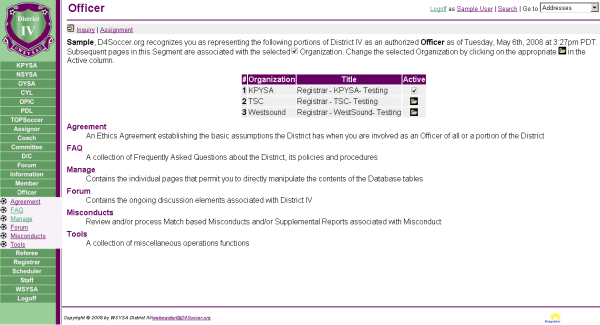
- Select D/C: Team Placement or Officer: Manage - Team Placement or Registrar: Manage - Team Placement or Staff: Manage - Team Placement as applicable:
The system will automatically provide you a current listing of teams within your scope of authority (i.e. WestSound Officer would only see WestSound Teams, NSYSA Officer would only see NSYSA Teams.) that have in fact been placed.
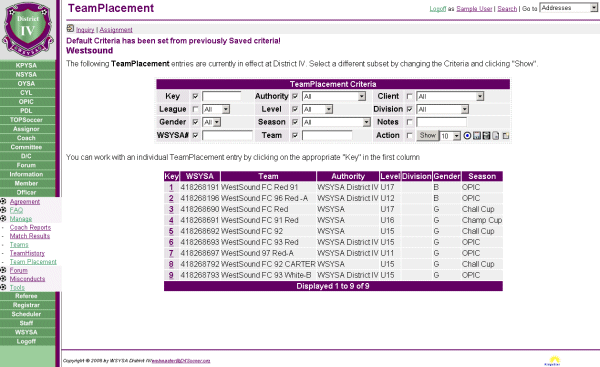
- You can now select/enter/modify the specific TeamsPlacement Criteria necessary or desired to see the particular team or group of teams within your level of authority and click on Search.
This will display a listing of the teams within your authority that meet the criteria selected.
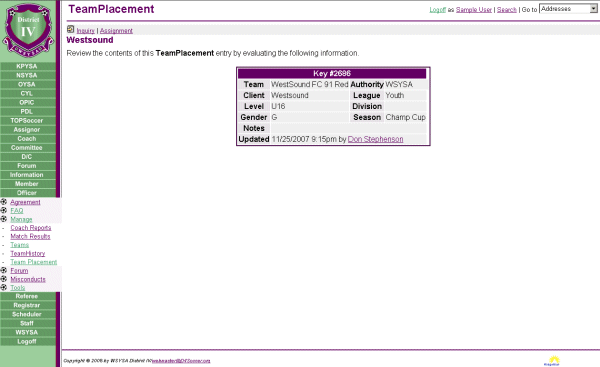
- To VIEW a particular Team's Placement information, click on the Key # for the team placement you desire to view.
From this screen you can all the pertinent information concerning this particular placement including the Date/Time this record was last updated and by Who.
- This concludes the FAQ for Viewing Your Listing Of Team Placements.
| Copyright © 2026 by Northwest Sound Youth Soccer Association/webmaster@NSYSASoccer.org |  |